
The auto updater will, if configured like below, run when the World of Tanks launcher is started.
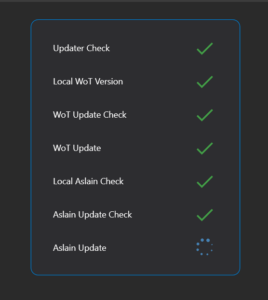
- Checks if there is a newer version of the updater, but does not automatically update itself.
- Checks for the currently available WoT version and the locally installed version.
- Depending on if the local WoT version is not up to date it will wait for the update to finish.
- Checks for a newer Aslain ModPack version and compares it to the locally installed version (if present)
- Updates if required with the last configuration used. The update does not require user interaction, unless Aslain changes something.
Once completed the updater will close and let you use the launcher again.
The update can also be used without configured it to automatically start on WoT launcher start. In that case it just does the Aslain update check regardless if there would be a patch for WoT. So it is encouraged if possible to configure it with launcher start.
Instructions
- Open secpol.msc from the Windows Search
- Go to Advanced Audit => System Audit => Detailed Tracking
- Enabled “Audit Process Creation” for successful processes and close it
- Open Taskplaner from Windows Search
- Create Task
- Put in any name like Aslain Auto Updater
- Create Trigger
- Task Start => On event
- Custom => Edit filter
- Add the following with YOUR WoT path
<QueryList>
      <Query Id="0" Path="Security">
            <Select Path="Security">*[System[Provider[@Name='Microsoft-Windows-Security-Auditing'] and EventID=4688] and EventData[Data[@Name='NewProcessName']='C:\\World_of_Tanks_EU\wgc_api.exe']]
            </Select>
      </Query>
</QueryList>- Actions => New
- Action => Program Start
- Either copy the path of the updater here or select it with search
- Optionally disable the option that the task is not run when the system is on battery
- Action => Program Start